-
[iOS] 커스텀 폰트 (Custom Font) 추가하기/iOS 📱 2026. 1. 28. 01:18반응형
1. 폰트 준비
TTF는 애플에서, OTF는 마이크로소프트에서 개발된 저장 방식이라고 합니다.
2. 리소스 추가
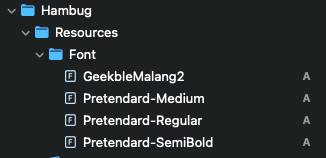
다운로드 받은 폰트를 Resource 폴더에 추가합니다.
3. info.plist 추가
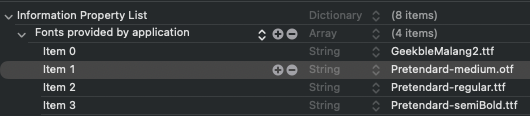
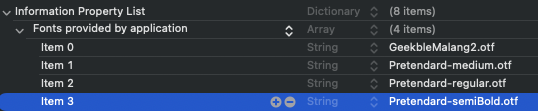
프로젝트에 글꼴 파일을 추가한 후에는 iOS에 해당 글꼴을 알려야 합니다. 이를 위해 Info.plist에 “Fonts provided by application” 키를 추가하십시오(원시 키 이름은 UIAppFonts입니다). Xcode는 키에 대한 배열 값을 생성합니다; 글꼴 파일 이름을 배열의 항목으로 추가합니다. 파일 확장자를 이름에 반드시 포함하십시오.
4. 사용
textLabel.font = UIFont(name: "Pretendard-Regular", size: 13)

Text("Hello, World")
  .font(.custom("Pretendard-Regular", size: 13))
등록 된 폰트를 확인하고 싶다면 아래 코드를 사용하면 된다.
for family in UIFont.familyNames.sorted() {
  let names = UIFont.fontNames(forFamilyName: family)
  print("Family: \(family) Font names: \(names)")
}

// Family: Pretendard Font names: ["Pretendard-Regular", "Pretendard-Medium", "Pretendard-SemiBold"]
정리
- 매우 간단하다. Xcode 프로젝트에 폰트를 위치시키고, info.plist 에 작성하여 프로젝트에 알리면 된다.
- 다운로드 받은 파일명과, 실제 사용하는 Font name 은 다르기 때문에 주의해야한다.
Pretendard-medium.otf 를 Resource에 저장하고, info.plist 에도 Pretendard-medium.otf 기입하더라도
Pretendard Family는 위 예시코드와 같이 Pretendar-Medium 으로 정적인 Font name을 가진다.
# 참고자료
https://developer.apple.com/documentation/uikit/adding-a-custom-font-to-your-app
Adding a Custom Font to Your App | Apple Developer Documentation
Add a custom font to your app and use it in your app’s interface.
developer.apple.com
반응형' > iOS 📱' 카테고리의 다른 글
[iOS] SPM Package 등에서 커스텀 폰트 (Custom Font) 추가하기 (0) 2026.01.28 [iOS] MultipeerConnectivity(P2P 프로토콜) 소개 및 예제 프로젝트 (1) 2025.05.12 [UIKit] iOS 앱 화면 밝기 조정하기 (0) 2025.02.13 [UIKit] UIKit의 스토리보드 Preview 적용하기(Storyboard, Preview, 미리보기) (0) 2024.12.08 [iOS] Meet AccessorySetupKit 정리 (0) 2024.06.14